![alcomy_logo_color_black.png]](https://help.alcomy.com/hs-fs/hubfs/alcomy_logo_color_black.png?height=50&name=alcomy_logo_color_black.png)
🚨 IMPORTANT - THIS ACTION CAN NOT BE UNDONE: Delete a medication should only be used if a medication was entered in by accident.
🚨 If a medication has been discontinued, DO NOT USE THE DELETE MEDICATION IF A MEDICATION HAS BEEN DISCONTINUED BY A DOCTOR.
💡 View the "Discontinue a Medication" training to discontinue a medication rather than deleting it.
Deleting A Medication
This will delete the medication from the system entirely and will appear as if it never existed. We can't stress the importance that once this action has been taken, it can not be undone.
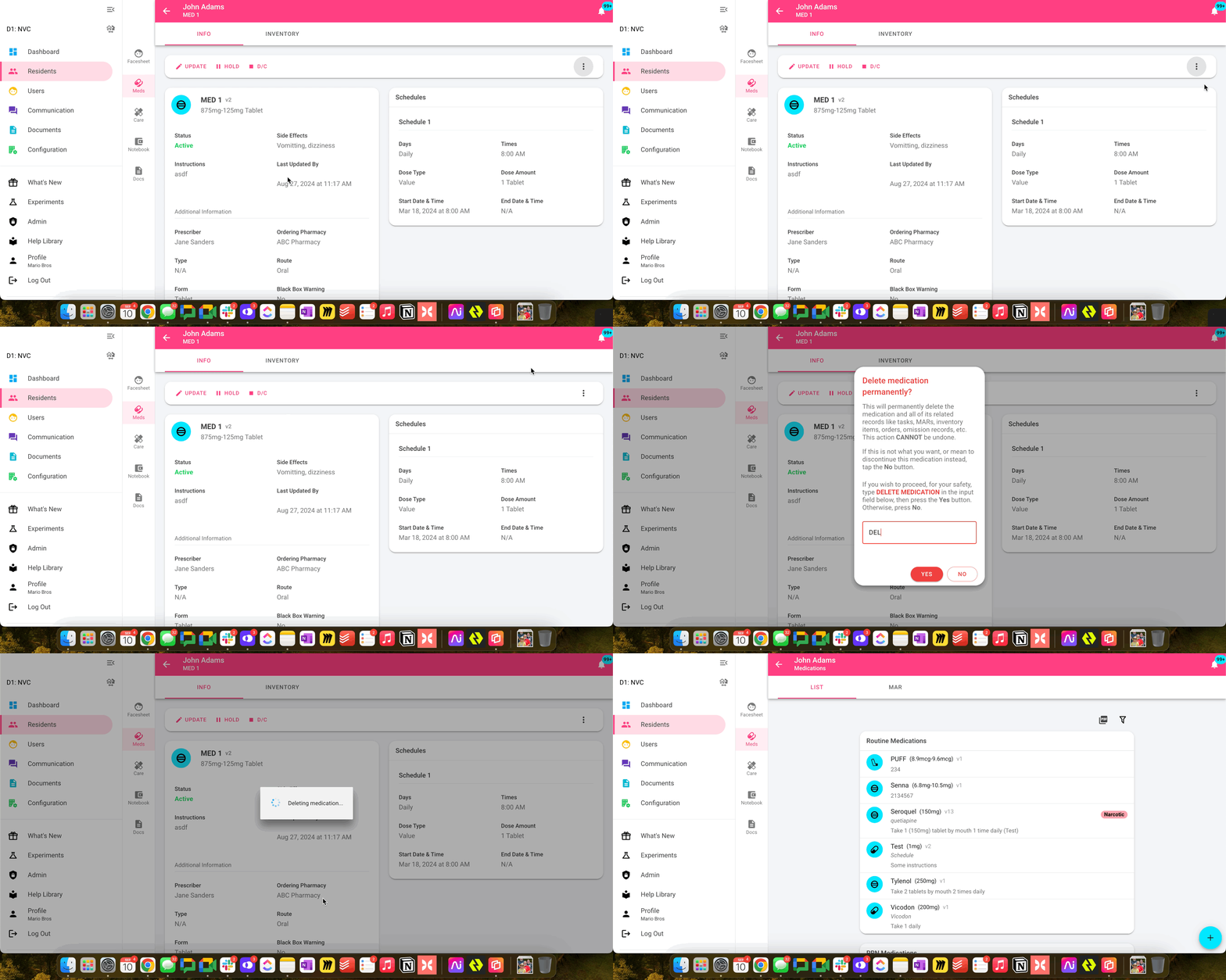
Step 1:
Navigate to the medication you would like deleted. Click on it to view the details.
Step 2:
Click the 3 dots in the top right corner (to the right of the buttons: Update, Hold, D/C) and click 'Delete Medication'.
Step 3:
You will be prompted with a message and an input field where you will type 'DELETE MEDICATION'.
🎉 Success! The medication and it's data have been deleted.